
Domain Overview
We've seen the project brief, and we've seen the app.
What's the first step to go from one to the other?
Let's explore the app's domain.
What's a Domain?
When you learned Java, you certainly learned about object-oriented programming (OOP).
When we develop software in an OOP language like Java, we write code to model real-world things, or "objects".
Which objects we use, how we structure them, and how they interact make up our app.
We call these objects the app's "domain". We call the process of working out the objects in the domain "domain modelling".
Different domain modelling techniques exist, such as noun-verb analysis, and Event Storming. Regardless of the technique you use, I consider domain modelling more of an art than a science.
In an effort to keep things approachable for this build, I'll give you the domain model I came up with.
Let's explore the app's domain!
Explore the App's Domain
You don't need a fancy technique to tell you that a task app needs an object to model a task.
What's not obvious is actually what state and behaviour this task object must have to make our app work.
For now we'll focus on state, or the fields this class needs. From this we'll learn how to structure our data.
Modelling behaviour, or the class's methods, is less important at this stage.
Let's start with a Task class to model tasks in our Task App.
Let's now ask the question, "What makes a task"?
Title & Description
We know each task has a title and optional description.
This is text data, so we'll use the String type for the title and
description fields in the Task class.
Due Date
Also mentioned in the project brief is a task's due date, or when the user should complete the task by.
For our Task App we'll allow the user to select a date, but not a time.
This means we can use the Java LocalDate type for the dueDate field.
Task Status
What's the goal of every task? For it to go from open to completed! This tells us a task object can exist in at least one of two states.
We could use a boolean, where false means the task is open, and true means the task is complete.
But what if we want to introduce more states later? Perhaps an archived state, or a cancelled state? Using a boolean won't make this easy!
Therefore, we'll use an enumeration, or "enum", named TaskStatus. It has an
OPEN value for a task the user has yet to do and a COMPLETE value for a
task the user has completed.
We'll use the TaskStatus type for the status field on our Task class.
Task Priority
Some tasks are more important than others, so they need a priority level.
We'll use the priorities "high", "medium", and "low". As we've limited options and we know about them ahead of time, this is another great case for an enum.
We'll use a TaskPriority enum, which can have the values HIGH, MEDIUM,
and LOW.
We'll use the TaskPriority type for the priority field on our Task class.
ID
We've captured all of the fields we need from the project brief, so what are we missing?
Let me ask you this, "How can our app tell one task object from another?" They may have different titles, but we need something more reliable than that. We need a unique identifier!
We could use a numeric ID which would be unique in our database. However, Universally Unique IDentifiers, or UUIDs, have the added benefit of being unique everywhere. This gives us extra options for future features.
We'll use a UUID type for the id field on our task app.
Created and Updated At
It can be useful to know the time and date an object was created and last updated.
I like to call these audit fields. They give us useful information that we can use to check everything is working as it should be.
We'll use the Java Instant type for both the created and updated
fields on our Task class, allowing us to capture date, time, and timezone
information.
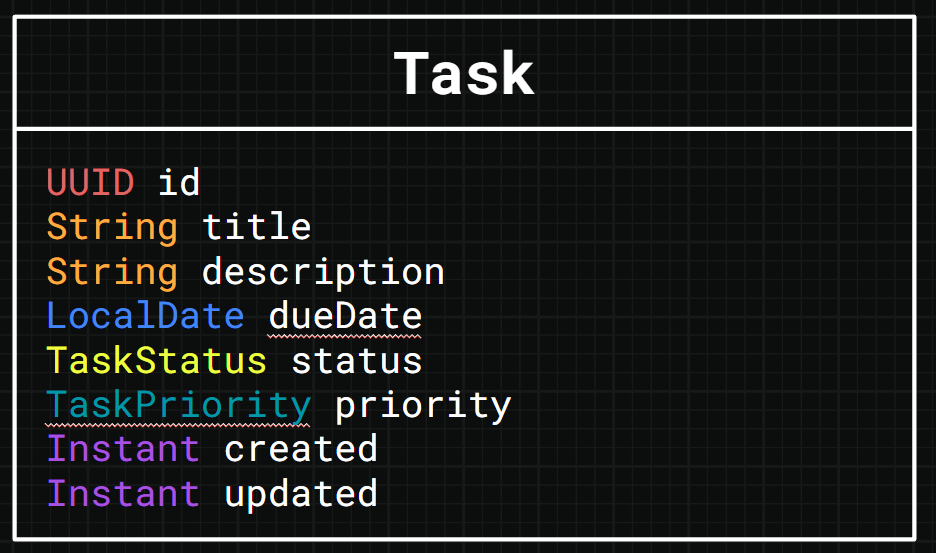
With that we've modelled the entire domain for our app, but before we get to coding let's figure out our app's architecture.
Summary
- Explored the concept of an app's domain.
- Designed the domain for the Task app.
