
Domain Model Summary
Let's explore the initial domain model described in the project brief.
Review the Domain Diagram
After spending a bit of time analyzing the project brief, using a variation on the "noun-verb analysis" technique, I produced the following domain diagram:
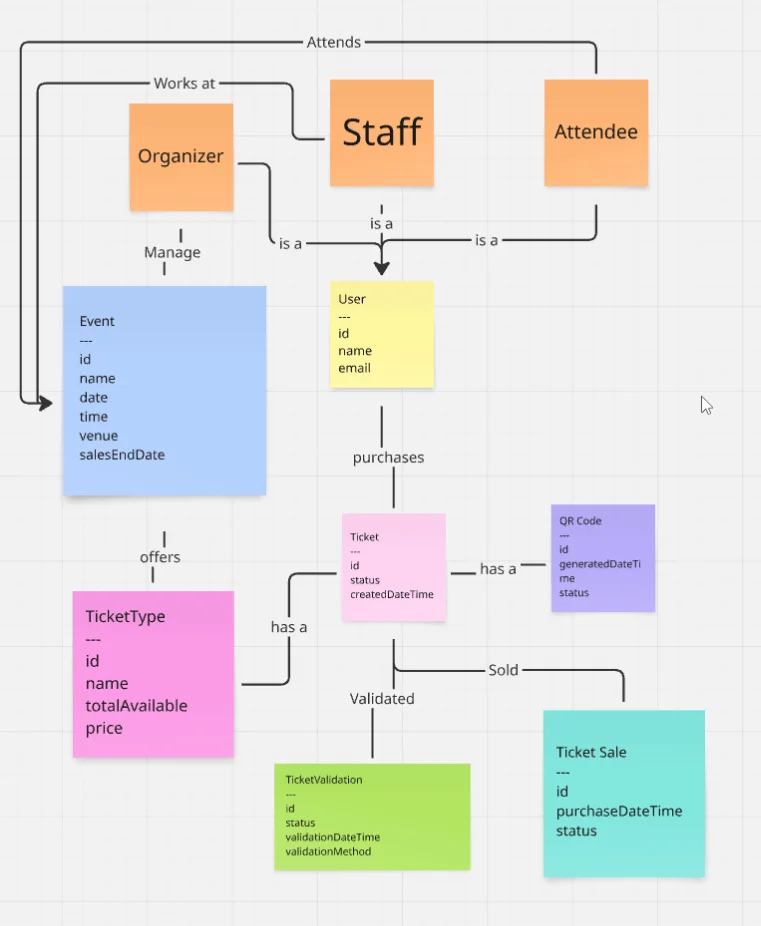
Or if you prefer the MermaidJs version:
classDiagram
    class Event {
        id
        name
        date
        time
        venue
        salesEndDate
    }

    class TicketType {
        id
        name
        price
        totalAvailable
    }

    class Ticket {
        id
        status
        createdDateTime
    }

    class QrCode {
        id
        generatedDateTime
        status
    }

    class Organizer {
    }

    class Attendee {
    }

    class Staff {
    }

    class User {
        id
        name
        email
    }

    class TicketValidation {
        id
        status
        validationDateTime
        validationMethod
    }

    class TicketSale {
        id
        status
        purchaseDateTime
    }

    Organizer "is a" --> User
    Attendee "is a" --> User
    Staff "is a" --> User
    Organizer "organizes" --> Event
    User "purchases" --> Ticket
    User "validates" --> TicketValidation
    Event "offers" --> TicketType
    TicketType "categorizes" --> Ticket
    Ticket "validates" --> TicketValidation
    Ticket "purchased" --> TicketSale
    Ticket "has a" --> QrCode
    Staff "works at" --> Event
    Attendee "attends" --> Event
Explore the Initial Domain
From the domain model, I've identified the following domain objects.
Note that this is just our initial understanding, which we will refine over time.
Event
The Event class represents a planned gathering with properties like:
id- A unique identifiername- The event's titledateandtime- When the event occursvenue- Where the event takes placesalesEndDate- When ticket sales stop
Ticket Type
The TicketType class defines different categories of tickets available for an event:
id- A unique identifiername- The type of ticket (e.g., "VIP", "Standard")price- Cost of the tickettotalAvailable- Maximum number that can be sold
Ticket
The Ticket represents an individual purchase:
id- A unique identifierstatus- The status of the ticket, perhaps it's been cancelled?createdDateTime- The date and time the ticket was created
QR Code
The QrCode represents the code used to represent the ticket's information, present on each ticket:
id- A unique identifiergeneratedDateTime- The time and date the QR code was generatedstatus- The status of the QR code -- is it still valid?
User
The User class represents people interacting with our system, where Organizer, Attendee and Staff are different types of User:
id- A unique identifiername- Person's nameemail- Contact information
Ticket Validation
Finally, TicketValidation is for event entry management:
id- A unique identifiervalidationTime- When validation occurredvalidationMethod- How it was validatedstatus- Result of validation
We'll evolve this domain diagram further as our design progresses.
Summary
- Events can have multiple ticket types, each with their own pricing and availability
- Users can act as organizers, event goers, and staff
- Tickets include QR codes for validation at event entry
- Ticket validation ensures proper event access control
